You'll learn how to: Find Get Paid in your avatar menu, open it, and know what it takes you to.
Time: 2 minutes.
Prereqs: You have a Nynch account and you've signed in. Get Paid opens in a new browser tab, so allow pop-ups from Nynch if your browser blocks them.
What Get Paid is
Get Paid is a link in your avatar menu. It opens Nynch's referral portal, hosted by Endorsely, in a new tab. Endorsely is a separate service, so the page you see there is not part of Nynch.
Partner accounts can also enter an Endorsely referral code on the Partner tab. Nothing in Settings shows payouts, so anything about payments is on the Endorsely page.
Open Get Paid
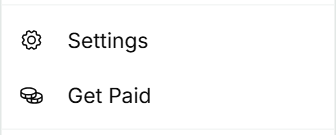
- Click your avatar (top-right of the screen).
- Click Get Paid.
- The Endorsely page opens in a new tab. Sign in there if it asks you to.
Close the tab when you're done. Your Nynch tab stays where it was.
If something goes wrong
- Symptom: "Nothing happens when I click Get Paid." → Fix: Your browser may have blocked the new tab. Allow pop-ups for Nynch in your browser's address bar, then click Get Paid again.
- Symptom: "The Endorsely page asks me to sign in." → Fix: Sign in with the account that belongs to the referral programme. Nynch can't sign you in there.
- Symptom: "I'm a partner and my referral code is missing." → Fix: Enter it in the Endorsely referral code box on the Partner tab.
- Symptom: "I can't find my payment details." → Fix: Get Paid opens Endorsely, which sits outside Nynch. Look for payment details on that page.
FAQ
Q: Is Get Paid part of my Nynch subscription? No. It's a link to a separate portal. Your Nynch plan and billing are managed in the Account tab. See View billing history.
Q: Do I need Get Paid to use Nynch? No. Nothing else in the app depends on it.
Q: Why does Get Paid open a different website? The link points to Endorsely, the service that hosts the portal. Nynch doesn't host that page.
Q: Who do I contact about a payment? Start with the Endorsely page. If the problem is inside Nynch, contact Nynch support.
Related: Settings, tab by tab | Activate your referral network | View billing history