An AI Memory Layer for
Your Business Relationships.
Generic chatbots start every conversation from a blank screen. Nynch Assist starts every conversation already knowing who matters, what changed, what is open, and what to do next.
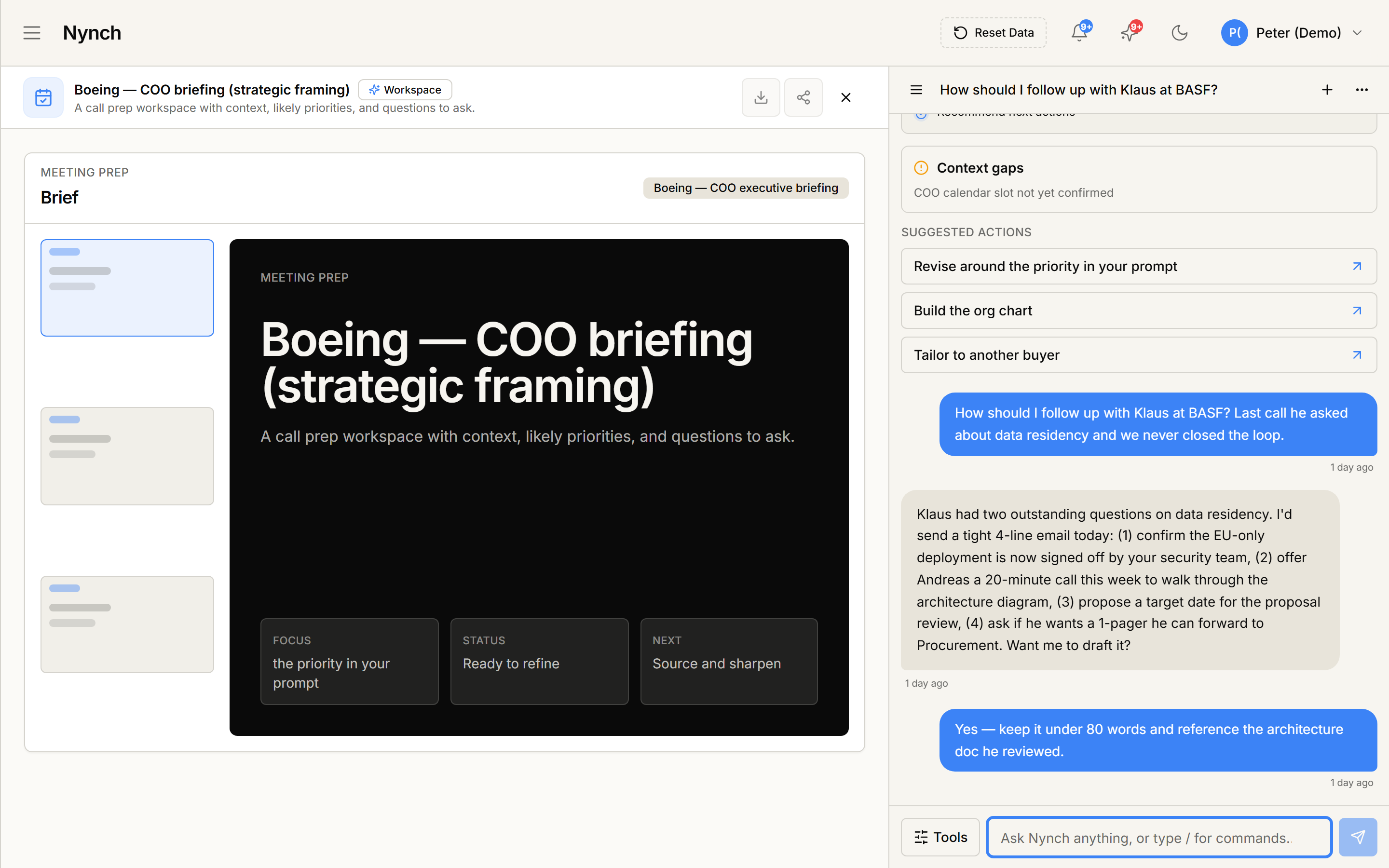
A briefing canvas + an AI conversation panel. Both pulled from your live deal, both anchored to what was actually said in the last call.
You should not have to remember everything.
Most AI assistants make you the database. Every prompt starts the same way: who is this person, what did we last talk about, what did I promise, when did we meet. By the time you have typed the context, the productivity gain is gone. Worse, the answers drift because the context is incomplete.
- ✕ Blank chat every time
- ✕ You supply every fact about every contact
- ✕ No memory of open promises or quiet relationships
- ✕ Drafts without context, so they sound generic
- ✕ No audit trail of what data was used
- ✓ Already knows your contacts, deals, and commitments
- ✓ Pulls only the slice it needs for the question at hand
- ✓ Surfaces open loops and quiet relationships on its own
- ✓ Drafts with full relationship context baked in
- ✓ Read-only, user-scoped, and audit-logged by default
Four buttons. The work that used to take half a morning.
The most useful Assist conversations are the same four every week. We made them buttons. Click once. Assist reads the right context. You get the answer.
Brief me on a relationship
Walking into a call with someone you have not spoken to in three months? Assist pulls the last interactions, open commitments, deal context, ScoreApp results, and recent signals into a one-page brief.
“Brief me on Sarah at Acme”Find open loops
Every relationship-led business runs on promises. Assist finds the things you said you would send, introduce, or follow up on, and groups them by what is still open and who is waiting on you.
“What did I promise that I have not delivered?”Draft my monthly digest
The newsletter or update you send your top clients each month, written from real activity in your network. Assist drafts it from your actual conversations, deals, and signals so the digest sounds like you, not a template.
“Draft my November digest”What changed this month?
The view your relationships do not give you on their own. New jobs, new deals opened, deals that stalled, relationships that have gone quiet, commitments completed. One scroll, then back to work.
“What changed across my network this month?”Eight context sources, all yours.
Assist does not guess and does not search the open web for your relationships. It reads from a defined set of sources inside your account. Three families, eight sources, every one of them scoped to your data.
Your relationship graph
- Contacts
- Companies
- Deals
- Commitments
Your interaction history
- Email threads
- Meeting transcripts
- Notes and activities
- Timeline of every contact
Your connected world
- ScoreApp results
- Connected MCP tools
- Connected native integrations
- Available context catalogue
One memory layer. Four surfaces.
The Context Layer is not a separate tab you have to remember to open. It is everywhere you already talk to Assist.
Main Assist page
The full chat experience. Prompts appear in the empty state under “Ask with your context”.
Side panel
Slide-out assistant on any screen. Same prompts, available without leaving what you are doing.
Ask Nynch rail
Saved prompts pinned to your workspace rail. One click from anywhere you work.
Prompt library
A full catalogue under the Context Briefs category. Reuse, customise, or build your own.
More powerful, not more reckless.
An AI that can read your business has to be governed. The Context Layer ships with four hard guardrails baked in, not as settings you have to configure.
No write paths
Assist cannot send emails, change deal stages, delete data, or rewrite relationship records through the Context Layer.
Only your data
Every query is filtered by your user account. Assist cannot read across customers, organisations, or teammates you do not have access to.
Every read is recorded
Every Context Layer query is written to an audit log with the source, filters, row count, and status. Trust by visibility, not by promise.
No raw exports
Hard caps on every source mean Assist cannot exfiltrate your database. It pulls the slice it needs, then stops.
Four steps, every time you click a prompt.
Discover
Assist asks the Context Layer what sources exist for your account, before it does anything else.
Describe
For each source it might need, it reads the schema so it knows what filters and fields are available.
Query
It pulls a small, bounded slice of the right data. Read-only, scoped to you, row-limited, logged.
Answer
Assist writes the brief, digest, or list, with the context already grounded in your real data.
Built for relationship-led businesses.
Different roles use the same four prompts for very different reasons.
Brief me on a relationship before every discovery call. The same context that used to live in a notebook, now ready in seconds with every conversation, commitment, and signal already pulled in.
What changed this month, run across multiple clients. The view a portfolio operator never gets in any single client’s tools, surfaced from your own relationship graph.
Find open loops, run every Monday. The promises your team made across calls last week, grouped by client and owner. Trust gets compounded by following through, and following through starts with not forgetting.
Draft my monthly digest, one click per account. The proactive update that keeps clients warm, drafted from real activity, edited in minutes, sent before the end of the day.
Questions About Nynch Assist
It is the structured map of your business relationships that Assist reads before answering. Instead of starting from a blank chat, Assist can discover what context exists in your account (contacts, companies, deals, commitments, interactions, ScoreApp results, connected apps, MCP tools) and retrieve a safe, bounded slice of the right data to ground its answer.
The Context Layer is read-only. It cannot send emails, change deal stages, delete data, rewrite relationship records, or create external tasks. Every read is scoped to your user account, capped at a small row limit, and written to an audit log. Assist never executes raw SQL on your data.
Four prompts ship with the Context Layer: Brief me on a relationship, Find open loops, Draft my monthly digest, and What changed this month? They appear inside the main Assist page, the side assistant panel, the Ask Nynch rail, and the prompt library so they are reachable from anywhere in the product.
Contacts, companies, deals, commitments, and interaction history are first-party sources available to every Nynch account. ScoreApp results, connected MCP tools, and connected native integrations are exposed conditionally, only when you have those integrations set up. Assist can list the sources it has access to before reading from them.
Yes. Assist still answers general questions and helps you write. The Context Layer makes it dramatically better at relationship work, because it stops asking you to retype context it already has.
Stop being the database for
your own AI assistant.
Book a 30-minute walkthrough on your actual data. We will run the four prompts live, and you will see what your network has been telling you all month.