You'll learn how to: Generate a 30-day content sprint and a 12-month map from your Manifesto, and turn your Point of View Model into a pitch deck, a webinar or an executive briefing.
Time: About a minute to generate each one. Edit the parts you will actually use.
Prereqs: For the sprint and the map, a written or generated Manifesto. For the three Point of View Model assets, a model with a goal and all three outcomes named. Nothing needs to be published.
Why a Launch Kit matters
Launch Kit turns your writing into things you can use this week. Your Manifesto becomes a 30-day sprint (weekly themes and LinkedIn posts) and a 12-month directional map. Your Point of View Model becomes one of three presenter assets, each with its talk track in the speaker notes and a PowerPoint file you can download:
- Pitch deck, your core sales deck for a meeting with one buyer. Thirteen slides: the problem, who feels it, what it costs, the old way, what you believe instead, your model, what you do, what changes, proof, why now and the ask. Each section is marked either same for every buyer or changes per buyer, so you can see what to polish once and what to rewrite for each account.
- Webinar kit, a 45-minute talk for an audience, with a run of show, audience questions and invitation copy.
- Executive briefing, a 15-minute business case for senior decision makers that ends in one clear decision, plus a one-page summary to send.
Steps
- Switch to Strategy in the sidebar.
- Open Launch Kit (under Strategy System).
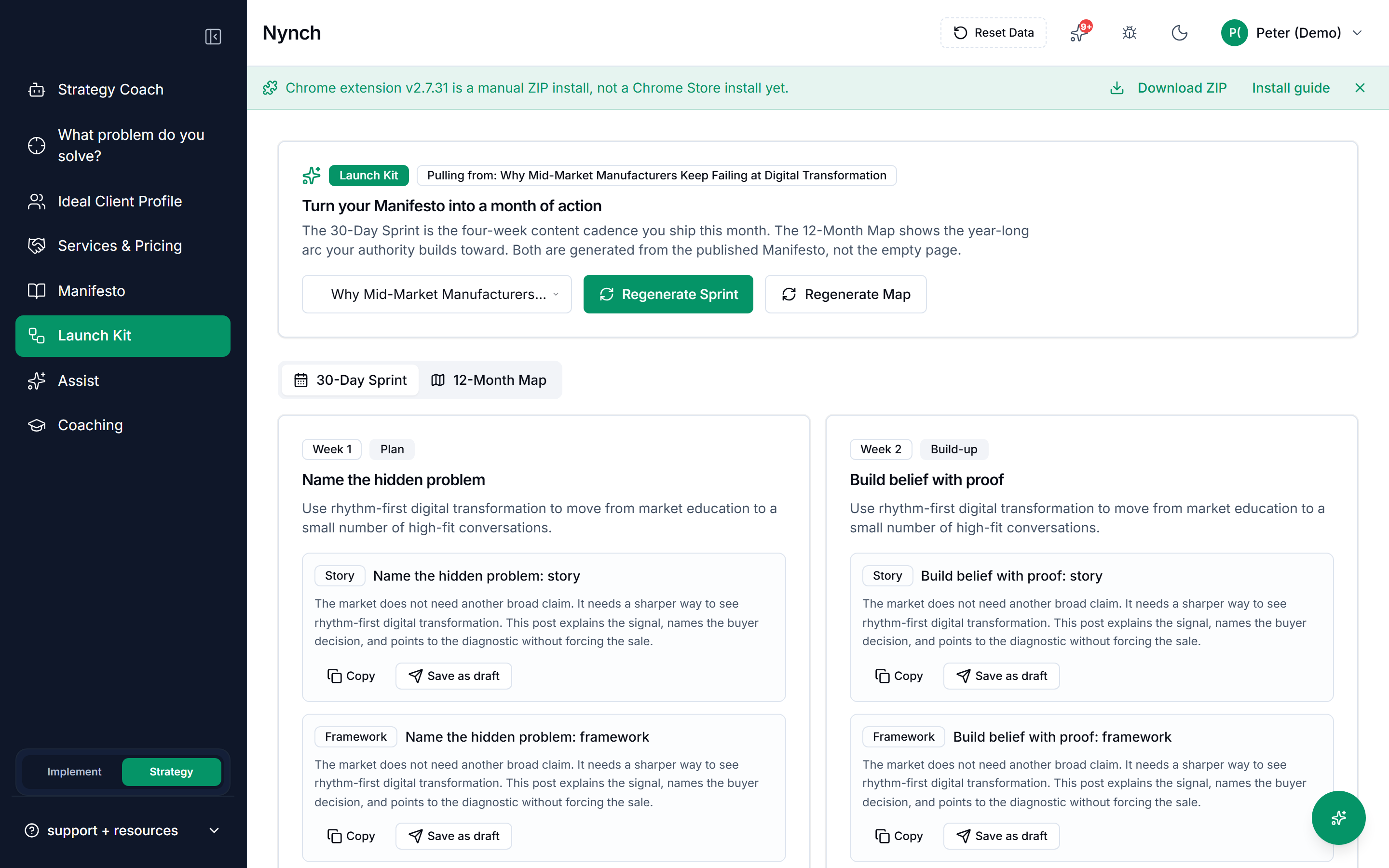
For the sprint and the map, click Generate 30-Day Sprint and/or Generate 12-Month Map. If you have no Manifesto writing, the empty state says Write or generate a Manifesto first with a button to the Manifesto step.
For a presenter asset, open the Pitch deck, Webinar kit or Executive briefing tab, choose a Point of View Model, and create it. If the model is missing its goal or an outcome name, the tab says so and links you back to fix it.
Generation takes about a minute. Sprint posts can be copied or saved as LinkedIn drafts in Content Studio (Implement → Visibility). Presenter assets can be edited in place and downloaded as a deck.
Paste a sample of how you write on Overview or Strategy Coach first. Everything generated here will match that voice.
After you generate
- Copy a post, or save it as a LinkedIn draft, then edit it in your own words.
- Edit a presenter asset in place, then download the deck. Creating it again replaces your edits, and the page warns you before it does.
- Generate again when the Manifesto or the model changes. If your model has moved on, the asset tells you it is out of date.
- Use the 12-month map as a direction, not a calendar you must keep.
What happens after you send it
Each deal has its own version of the pitch deck, on the deal itself. It rewrites the seven sections that belong to that buyer from what they said on your team's calls, whoever recorded them, and leaves your own sections exactly as you wrote them. Approve it and add the slides to that deal's room. If the room has never been published, publish it and they can read them. if it is already published, publish it again so they get the new slides. Adding the deck again replaces the version already there, so they are never left holding two. What the old version recorded is kept, but the page reports the one you have sent, not the one it replaced.
Personalising again keeps the version it replaces. The last five are listed under Previous versions on the deck page, with the one you approved marked. Restore brings one back as a draft, so read it and approve it again before it goes in the room. the version it replaces is kept too.
Once the slides are in a room, each one records whether that buyer opened it. The deck page shows you which they read and which they never did, and the next meeting brief for that deal says the same, so the slide they skipped becomes the thing you open with. Nothing is shown about reading until they have actually opened something: a deck sitting unread is a fact about the room, not about them.
To see who read which slide, add the people you are talking to in the Deal Room tab and send each of them their own link. Reads through a person's own link carry their name on the deck page and in the brief. Reads through the room's shared link are still counted, but the page will not guess who made them.
If something goes wrong
- Symptom: "Generate is greyed out." → Fix: For the sprint or the map, open Manifesto and write or generate a point of view first. For a presenter asset, open Point of View Model and fill in the goal and all three outcome names. Published status is not required either way.
- Symptom: "The posts do not sound like me." → Fix: Paste a few paragraphs you wrote yourself into How you write on Overview, then generate again.
- Symptom: "My deck has no numbers in it." → Fix: That is deliberate. Figures appear only where they can be traced to a cited source, and anything else is reworded. Add your own proof before you present.
- Symptom: "An account version kept my wording for a section." → Fix: A section about the buyer can only quote numbers the buyer actually gave, with the same unit and currency. If the draft used any other figure, that section falls back to your own words rather than state something they never said. Add the detail to a meeting note and personalise again.
- Symptom: "I expected to upload a deck." → Fix: Launch Kit writes the assets for you and hands you a PowerPoint file to download. Your own files, case studies and client documents still live outside Nynch.
FAQ
Q: How do I build your launch kit? Generate a 30-day sprint and a 12-month map from your Manifesto, and a pitch deck, webinar or executive briefing from your Point of View Model.
Q: What do I need before I start? A Manifesto draft for the sprint and the map. A Point of View Model with its goal and three outcomes named for the presenter assets. Neither needs to be published.
Q: How long does this take? About a minute to generate each one. Then edit the parts you will use.
Q: Which asset do I use for a sales meeting? The pitch deck. The webinar kit is for an audience, and the executive briefing is for a board-level decision.
Q: Generate is greyed out? Finish the Manifesto or the Point of View Model it reads from, then come back.
Related: Use the Strategy Coach | Define Your Services and Pricing | Write Your Manifesto