You'll learn how to: Use the Strategy Coach to turn your rough positioning, problem statement, and source materials into a structured Strategy Map that seeds the rest of your Strategy tabs.
Time: 5-10 minutes to draft. Review and refine as needed.
Prereqs: You have some sense of the problem you solve or the market you serve. Don't worry about perfection yet.
Why the Strategy Coach matters
Your positioning, problem statement, services, and manifesto are the foundation that Nynch uses to score prospects, draft replies, suggest deal structures, and coach you in real time. The Strategy Coach compresses that work by letting you paste loose thinking and source material (frameworks, book notes, your house rules) and having it synthesize a draft Strategy Map that you then approve into the individual Strategy tabs.
A well-tuned strategy makes every other AI feature in Nynch sharper.
Steps
- At the bottom-left of the sidebar, toggle to Strategy mode.
- Click Strategy Coach.
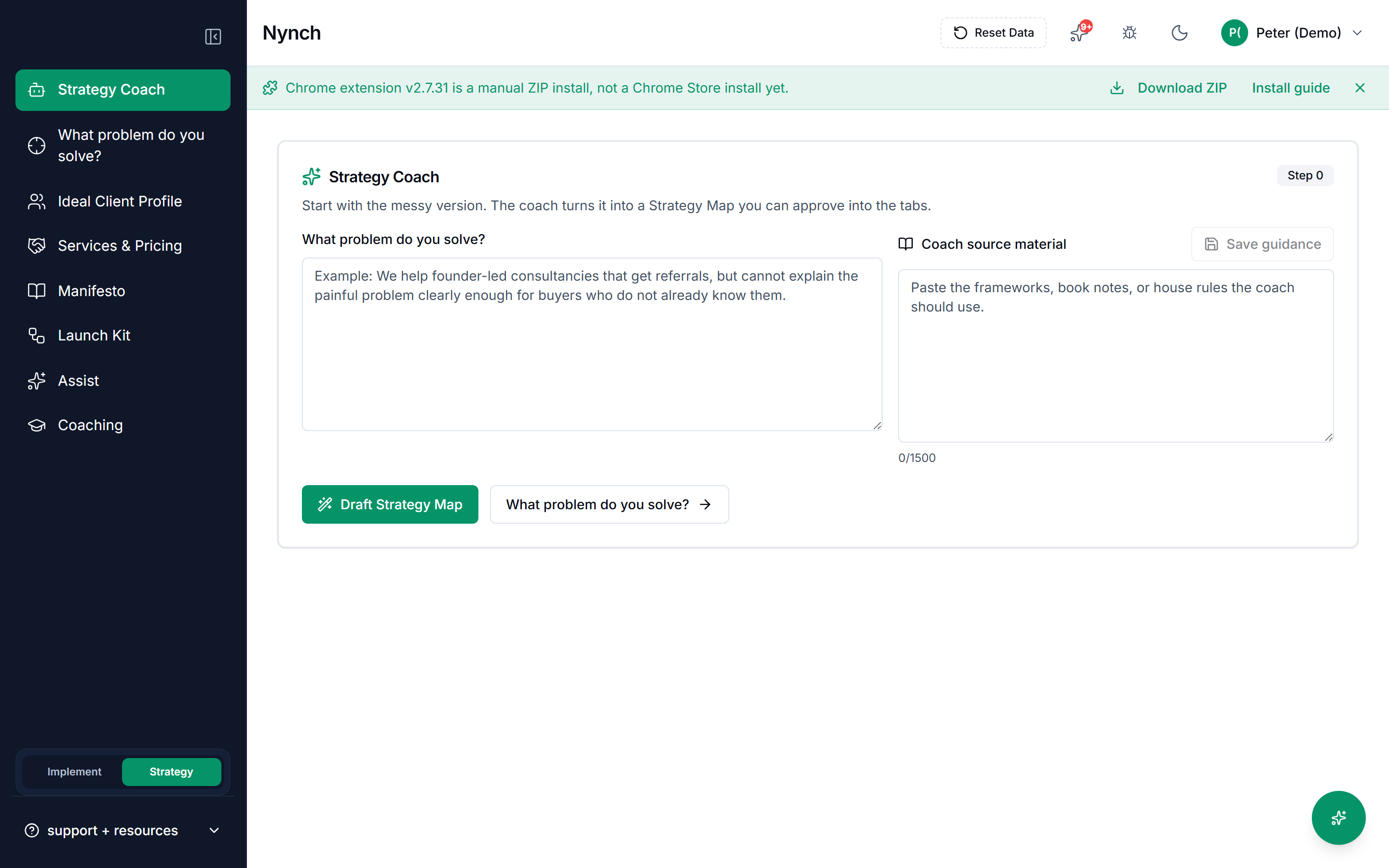
You'll see two text areas:
- What problem do you solve?: Your rough problem statement or positioning.
- Coach source material: Frameworks, book excerpts, playbooks, or house rules you want the coach to use.
Fill in What problem do you solve? with a paragraph or two describing the core problem your clients face or the transformation you create. This is required before you can draft. Examples:
- "Solo consultants struggle to land high-value clients. They network but rarely convert because they're not positioning themselves as the only choice."
- "Founders in the first year feel isolated and make expensive early mistakes because they don't have peer community."
(Optional) In Coach source material, paste frameworks or reference material you want to influence the strategy:
- A page from a positioning book.
- Your internal playbook or principles.
- An existing pitch or case study that captures your approach.
- Competitive research or category insights.
(Optional) Click Save guidance if you pasted source material. You can draft without it.
Click Draft Strategy Map. The button stays disabled until the problem box has text.
The Strategy Coach will synthesize your input and present a draft Strategy Map with sections like:
- Core problem statement
- Ideal client profile summary
- Positioning statement or point of view
- Services / offerings sketch
- Key differentiators
- Tick the pieces that are useful. Click Save selected drafts. That writes them into the later Strategy tabs. If you click Open Ideal Client Profile (or another tab) before saving, Nynch asks whether to save, discard, or stay.
After a successful save, use Review … to open the first tab that received drafts.
Ideal Client Profiles from the coach get an importance number so scoring can start. Manifesto writing is enough for Launch Kit to generate a sprint.
Buyer pains land on the Problem tab as Needs review, labelled AI suggested. They are the coach's hypotheses about your market, not something you observed, so the Problem tab will not let them shape your strategy until you give one a real source: a named document or URL, and an excerpt you can point at. Open the pain, add where the claim actually comes from, and approve it then.
That extra step is the point. Everything downstream, prospect scoring, drafted replies, deal structure, treats an approved problem as something you know. A hypothesis promoted without evidence would spread through all of it looking like fact.
Drafting tips
- Be concrete, not generic. "Contractors bid jobs based on gut, not data" is clearer than "improve decision-making."
- Name the person and the cost. "A wedding planner spends 40 hours on a $15k event they lose because they under-priced" is stronger than "pricing is hard."
- Paste real examples. If you have a case study or client email saying "this changed our business," paste it. The coach learns from specifics.
- Include your opinion. Your positioning is not true for everyone, it's true for you. "The old way is broken because X" is valuable.
Edit your guidance later
The coach's guidance stays in the Strategy Coach screen. If you want to refine your strategy later:
- Return to the Strategy Coach.
- Edit the guidance or source material.
- Click Save guidance.
- Run Draft Strategy Map again to see a new draft.
If something goes wrong
- Symptom: "The draft is completely off-target." → Fix: The source material may be too generic. Try pasting more specific frameworks or case studies. Or rewrite your problem statement in plainer, more concrete language.
- Symptom: "Draft Strategy Map is greyed out." → Fix: Add a problem statement. Source material is optional.
- Symptom: "Launch Kit still says I need a Manifesto." → Fix: Tick Manifesto and at least one service and Ideal Client Profile, then save. Or create a Manifesto from the Manifesto tab.
- Symptom: "The draft is good but I want to refine one section." → Fix: After approval, you can edit individual tabs (Problem Statement, Services & Pricing, Manifesto, etc.) directly. The draft is a starting point, not a lock.
FAQ
Q: How do I use the strategy coach? Use the Strategy Coach to turn your rough positioning, problem statement, and source materials into a structured Strategy Map that seeds the rest of your Strategy tabs.
Q: What do I need before I start? You have some sense of the problem you solve or the market you serve. Don't worry about perfection yet.
Q: How long does this take? About 5-10 minutes to draft. Review and refine as needed.
Q: The draft is completely off-target? The source material may be too generic. Try pasting more specific frameworks or case studies. Or rewrite your problem statement in plainer, more concrete language.
Q: Draft Strategy Map is greyed out? Add a problem statement. Source material is optional.
Related: Define the Problem You Solve | Configure an Ideal Client Profile | Define Your Services and Pricing