You'll learn how to: Send a card off your daily feed when you don't want to act on it, without losing the contact or the underlying record.
Time: 1 second.
Dismiss vs. Skip vs. Snooze
The daily feed has three close-button shapes for similar-but-different intents:
- Dismiss (X icon, "Dismiss"): take the card off Today. It stays gone. If it was a deal card, later cards about that same deal stay gone too.
- Skip (forward-arrow icon, "Skip for now"): push the card to the back of today's queue. You'll see it again later in the same session.
- Snooze (alarm-clock icon): pick Tomorrow, 2 days, 1 week, or Next Monday. Card is hidden until then.
Dismiss is the most common. Use it when you do not want this card again.
Steps
Mouse / trackpad
- Open Today from the left sidebar.
- On the focused (front) card, find the X button at the bottom of the action row. Its tooltip reads "Dismiss".
- Click it.
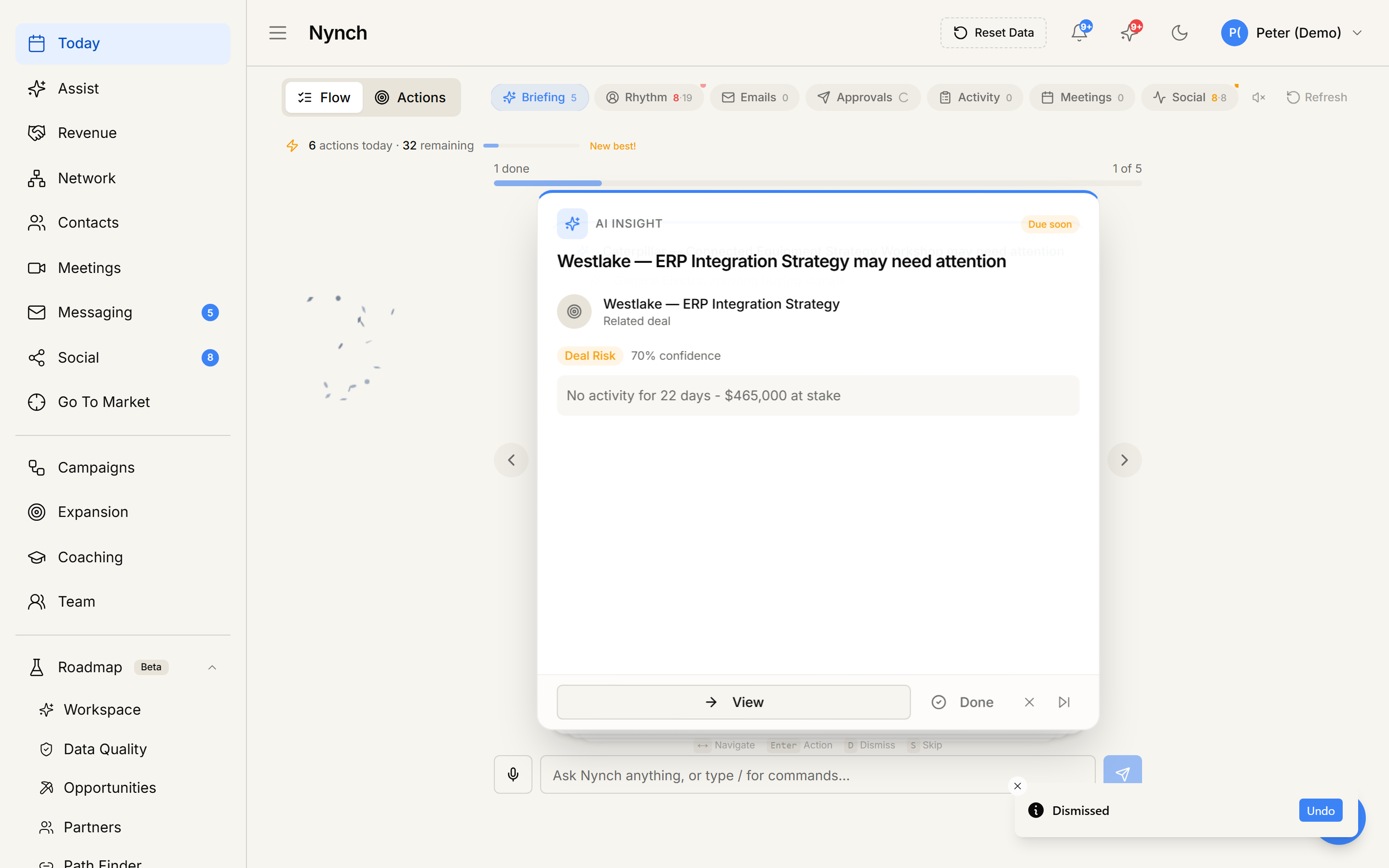
- The card slides off and the next one moves into focus. An Undo toast stays up for a few seconds if you tapped by mistake.
Touch device
- On the focused card, drag from right to left across the card body.
- A red "Dismiss" overlay appears as you drag.
- Release once the overlay is fully visible. The card animates out.
If you let go before the threshold, the card snaps back.
What got recorded
- The card is marked dismissed against your user and does not come back tomorrow.
- If the card was about a deal, an Insight, a next-step, or a deal alert, every later Today card about that same deal is hidden too. Undo stays up for a few seconds on all of those.
- The underlying contact, deal, or nudge is unchanged. You did NOT mark anything done.
When to use Dismiss vs. the other options
| Situation | Best choice |
|---|---|
| "I'll do it later today." | Skip |
| "I don't want this card again." | Dismiss |
| "Not until next week / next Monday / a specific date." | Snooze |
| "I already did this." | Log call / Log meeting / Add note (see Log a call from the daily feed) |
| "This person should not rank this high." | Click the rhythm badge on the card and move them to a lower-priority rhythm. |
If something goes wrong
- Symptom: "I dismissed by accident." → Fix: Tap Undo on the toast that appears for a few seconds. After that, find the contact or deal from People or pipeline.
- Symptom: "The same deal came back as a new card." → Fix: Dismiss now hides every card for that deal. Refresh Today if an old card is still on screen.
- Symptom: "Approval cards don't dismiss on swipe." → Fix: Swipe is disabled for approval items by design. Use the explicit X or Reject button on the card.
- Symptom: "The card flickered but didn't go away." → Fix: Brief network blip. Try again. If it persists, refresh.
FAQ
Q: How do I dismiss a card from the daily feed? Send a card off your daily feed when you don't want to act on it, without losing the contact or the underlying record.
Q: Where do I start in Nynch? Open Today from the left sidebar.
Q: How long does this take? About 1 second.
Q: I dismissed by accident? Tap Undo on the toast that appears for a few seconds. After that, find the contact or deal from People or pipeline.
Q: Will this card come back tomorrow? No. Dismiss is permanent. Snooze is the path when you want it back on a date. To change how often someone ranks, use the rhythm badge on the card.
Related: Log a call from the daily feed | Log a meeting from the daily feed | Snooze a rhythm reminder | Today, the daily feed.