Your AI learns your playbook.
Most “AI CRMs” run the same model on everyone. Superbrain watches what you do (which nudges you act on, which deals close, which relationships compound) and tunes itself to your specific revenue motion. It is the system-of-work layer inside Nynch: the part that turns context into prepared work and gets sharper from real outcomes. Day one is generic best-practice. Day 90 it knows your playbook better than any junior on your team would. Day 300 it is materially smarter than the day you started.
Every email, every call, every commitment. Superbrain remembers, prepares the work, and keeps you in control.
Three pieces. One feedback loop.
The Learning Loop is how three product surfaces work together to turn your usage into the AI’s training data, then turn that learning into better prepared work.
See the AI’s working
A dedicated screen showing every recommendation Superbrain has made, what you did with it, and what happened next. You see when the AI is confident, when it’s guessing, and where it’s improving.
Track every nudge
Every suggestion is tracked from first surface to acted-on to outcome. Which deal did it apply to? Did you act? What changed in the next 7, 30, and 90 days? The system answers all three for every nudge it’s ever made.
Prove what actually works
The Scorecard surfaces which nudges actually move deals forward for you, rather than for “consultants in general.” You stop trusting the AI on faith and start trusting it on evidence.
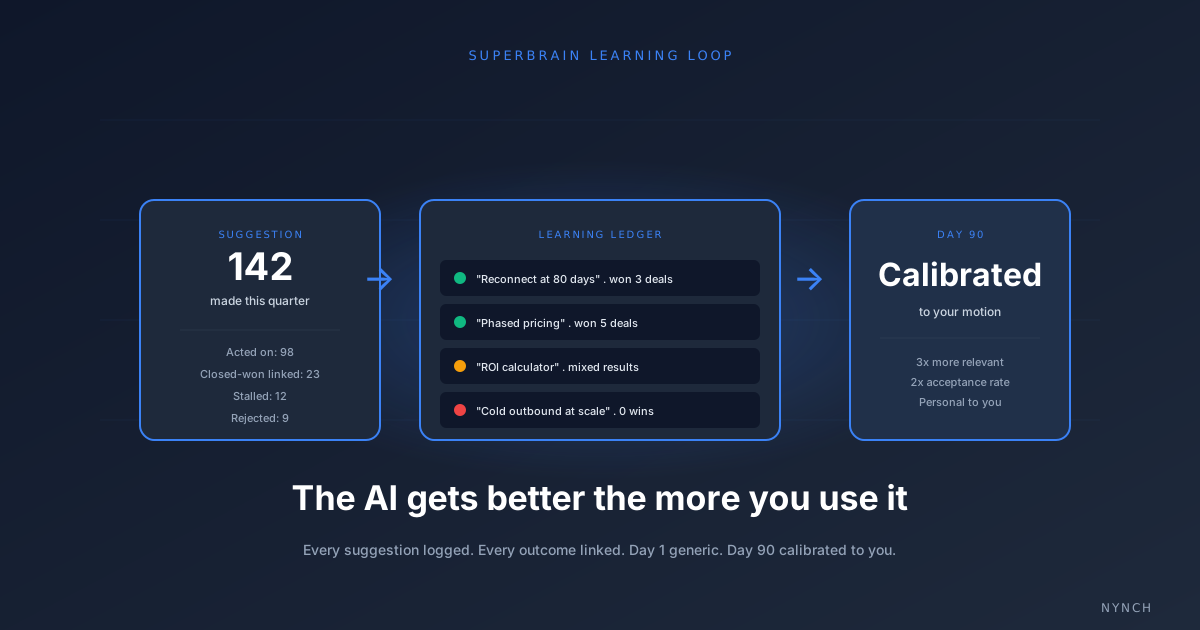
The Learning Ledger is the moat.
Underneath all three surfaces is one canonical record: every AI suggestion Superbrain has made, every action it prepared, every action you took, every outcome that followed. We call it the Learning Ledger.
The ledger captures what most AI tools throw away. Suggestions get linked to deals. Actions get linked to outcomes (won, lost, advanced, stalled). Outcomes feed back into how future suggestions are ranked. Every entry is yours alone, never pooled across customers.
After 90 days, the ledger holds a model of your business that doesn’t exist anywhere else. Not in any other tool, not in your head, not in any file. A new tool starting from your day zero would need to wait 90 days of real usage to catch up. The longer you use Superbrain, the further ahead it gets, and the harder it becomes to leave behind.
What you’ll feel by month three.
Useful out of the box
Superbrain runs on best-practice patterns from relationship-led growth research. Generic where it has to be, but immediately useful for daily prioritisation, signal detection, and meeting prep.
Pattern recognition kicks in
The system has enough usage data to start tuning. The Suggestion Scorecard begins to show which nudge categories actually convert for your style of selling. Surface-level personalisation becomes visible.
Calibrated to you
Recommendations are visibly different from a generic AI’s. The system knows whether you win with data-driven ROI arguments or relationship narratives. Your Focus 10 looks like your Focus 10, rather than a template.
By day 300, Superbrain has moved past pattern recognition into something rarer. It knows which low-risk follow-up work is safe enough to create for you without asking, which suggestion types you have stopped acting on so it can stop pushing them, and which categories have produced real outcomes often enough to deserve more autonomy. The longer it runs, the more useful it becomes, because every accepted, completed, ignored, or deleted suggestion calibrates the next one.
Materially smarter on day 300 than day 1. By design.
Calibrated Autonomy.
Superbrain does not run at one fixed level of autonomy. It moves up and down a five-step ladder based on evidence. When a pattern is producing real outcomes for you, Superbrain takes a bit more initiative. When it stops producing outcomes, Superbrain steps back. Proactive help, calibrated to what is actually working.
Observe
Quietly watch a pattern across your network. No surfacing yet. The data is collected so we know if the pattern matters.
Suggest
Surface a recommendation. You decide whether to act on it. Outcomes feed back into whether the pattern is worth surfacing again.
Queue low-risk work
Prepare safe, low-risk follow-up work so it is ready when you need it. Still gated behind approval, but the heavy lifting is done.
Auto-create low-risk
Once evidence is strong enough, Superbrain creates safe follow-up actions without making you click approve every time. Approval fatigue, gone.
Pause
If a pattern stops proving useful, Superbrain stops pushing it. No noise. The bar to come back up the ladder is real outcomes.
Outcome-based learning.
Superbrain does not just remember what it suggested. It learns from what actually happened afterwards. Every suggestion produces one of four outcome states, and each state changes how the next suggestion is ranked.
You acted on it. The pattern earns confidence.
Action delivered the outcome it was supposed to. The pattern earns more confidence.
Repeatedly skipped. The pattern is deprioritised, then paused.
Explicit dismissal. The pattern is paused immediately.
Each outcome state changes the success rate Superbrain tracks for that pattern. Patterns that compound success move up the autonomy ladder. Patterns that produce silence move back down. Smarter from real outcomes, not from prompts.
Why Superbrain is confident, or cautious.
Most AI tools leave you guessing why the assistant just made a decision. Superbrain shows its working. Inside the settings, every active pattern has a plain-language trend explanation: what made Superbrain more confident, what made it pull back, and what the evidence currently looks like.
“Positive user behaviour and downstream outcomes are making similar low-risk actions more automatic. Five suggestions in this category have been accepted and completed in the last 30 days. Moving from Suggest to Queue low-risk work.”
Trust comes from seeing the reasoning, not from guessing.
Reduces approval fatigue. Never gives AI unsafe control.
More autonomy on low-risk work, no autonomy on high-stakes work. The blocklist is hardcoded into the autonomy ladder, not a setting you can toggle off.
Superbrain cannot automatically:
- ✕ Send emails on your behalf
- ✕ Delete data of any kind
- ✕ Change deal stages
- ✕ Rewrite relationship records
- ✕ Create external tasks in connected tools
High-stakes actions always require human approval. Superbrain can prepare low-risk follow-up work inside the permissions you set, with the source and proposed change visible for review.
No silent blind spots, as Nynch grows.
As Nynch ships new product areas, every new user-facing data table either registers as a Superbrain source or is explicitly blocked. The check is enforced in continuous integration, not as a guideline. The practical result for you: as the app grows, Superbrain keeps seeing more of the business, instead of becoming fragmented or blind to new areas.
A compounding work layer needs a compounding view of the business. Superbrain is built so that property holds, by default, forever.
How Superbrain compares to a generic AI assistant.
Most AI features in CRMs are general-purpose models bolted onto a contact database. Superbrain is built around the feedback loop. The difference shows up in what each system can actually answer.
| Capability | Generic AI CRM assistant | Superbrain |
|---|---|---|
| Logs every recommendation it makes | No | Yes (Learning Ledger) |
| Tracks whether you acted on a suggestion | No | Yes (Suggestion Lifecycle) |
| Shows which suggestion types convert for you | No | Yes (Suggestion Scorecard) |
| Recommendations change based on your outcomes | No | Yes |
| Day-1 advice and day-365 advice are different | No | Yes |
| Auditable confidence per recommendation | No | Yes (Learning Console) |
| Calibrated autonomy levels per pattern | No | Yes (five-step ladder) |
| Trend explanations for confidence changes | No | Yes |
| Hardcoded high-stakes blocklist | No | Yes (emails, deletes, stage changes blocked) |
| Works on day one without configuration | Yes | Yes |
By month three, the Suggestion Scorecard surfaces a clear picture: which of the AI's nudge categories convert for that specific user, on that specific deal size, in that specific industry. A consultant closing £200K engagements gets visibly different recommendations from one running £20K workshops.
The Learning Console makes this visible to you. You can see which suggestion types you accept most, which correlate with landed deals, and which the AI is still guessing on.
Both sides of every relationship.
Superbrain doesn't only learn what YOU did. It also remembers what THEY said. The client who mentioned year-end budget in October. The prospect who said "call me in July." The contact who offered a referral over coffee and never followed through. Each one captured, attached to the right person, surfaced at the moment it should become an action.
Most "AI CRMs" remember what you did. That is the easy half. The hard half is holding what your clients and prospects told you, sometimes a year ago, and bringing it back at the exact moment the moment arrives.
- Budget mention. A client said in October last year, "we always have leftover budget at year end." You haven't spoken since March. October arrives. Superbrain surfaces the line and prompts outreach.
- Callback date. A prospect ended a February call with "call me in July." That note lived in a transcript. Late June, Superbrain puts it at the top of your week.
- Unfulfilled referral. A client said at coffee, "I'll introduce you to Sarah at Acme." Three months later, no intro. Superbrain keeps the open thread visible until it closes.
This is what Superbrain learning a playbook actually means. Not just patterns in your own behaviour. The two-sided memory of every relationship you have ever had.
Questions about Superbrain.
Superbrain is the AI engine inside Nynch. It monitors your relationships and pipeline, turns context into prepared work, and learns from which suggestions you act on. Unlike generic AI assistants, Superbrain tunes itself to your specific revenue motion over time, so the longer you use it, the more useful it becomes.
The Learning Loop is how Superbrain gets smarter about your business. Every suggestion it makes is logged. Whether you act on it, the outcome that follows, and the deal-level signal it produces all go into a unified Learning Ledger. The Suggestion Scorecard then surfaces which nudges actually moved deals for you, rather than for consultants in general.
Day one Superbrain runs on best-practice patterns. By day 30 it has enough usage data to start tuning. By day 90 the Suggestion Scorecard shows clear patterns of which nudges convert for your specific style. By day 300 it is a calibrated operating layer, materially smarter than the day you started.
Calibrated Autonomy is the five-level ladder Superbrain uses to act on patterns. Observe quietly watches. Suggest surfaces a recommendation. Queue prepares low-risk follow-up work. Auto-create creates safe follow-up actions without constant approval clicks. Pause stops pushing a pattern that is not proving useful. Superbrain moves up the ladder when evidence is strong and back down when outcomes weaken.
High-stakes actions always require approval. Superbrain cannot automatically send emails, delete data, change deal stages, rewrite relationship records, or create external tasks. The blocklist is hardcoded into the autonomy ladder, not a setting you can toggle off.
Yes. The Superbrain Learning Loop, Console, Suggestion Lifecycle, and Scorecard are part of the core platform on every Nynch subscription. The Implementer plan includes group coaching that teaches you how to read and act on what Superbrain surfaces.
See the Learning Console live.
Book a 30-minute demo and we’ll walk you through Superbrain on a live account, including the Suggestion Scorecard from a customer who’s been using it for three months.