Skip to content
Product overview
Explore all 15 product areas1. Services and Offer2. Ideal Client Profile3. Find Prospects4. LinkedIn Network5. Relationship Management6. Relationship Intelligence7. Value Audits8. Personalised Outreach9. Authority and Content10. Meeting Intelligence11. Pipeline and Opportunities12. Proposals13. Deal Rooms14. Client Management15. Grow Existing Accounts
Today and AssistSell your business
Use cases Pricing In Person Workshop Resources Sign in Book a call

Relationship Review

Give every new contact a sensible place in your network.

Review your contacts in People, open the relationship history and choose an appropriate rhythm. See the resulting contact work in the activity planner.

Book a call

30 minutes. On your real data. Not generic slides.

See how it works
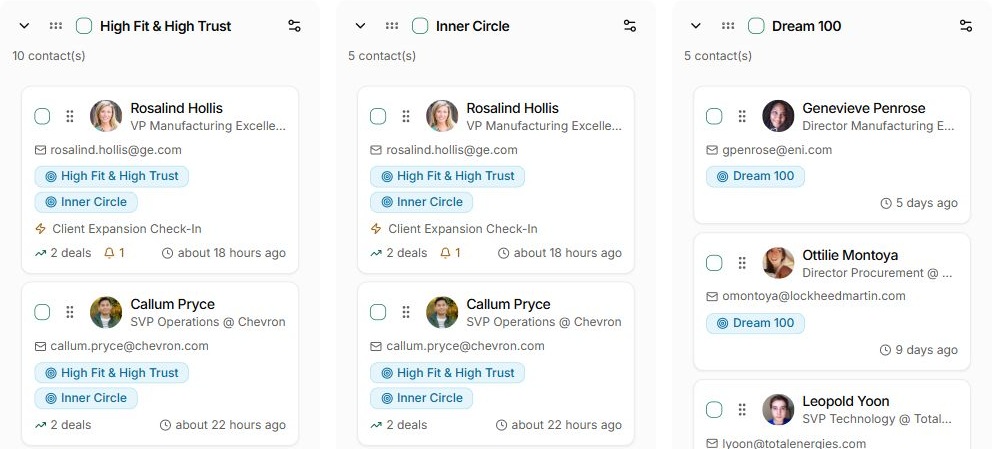
The current People Rhythm board, with contacts grouped by the relationships you want to maintain.
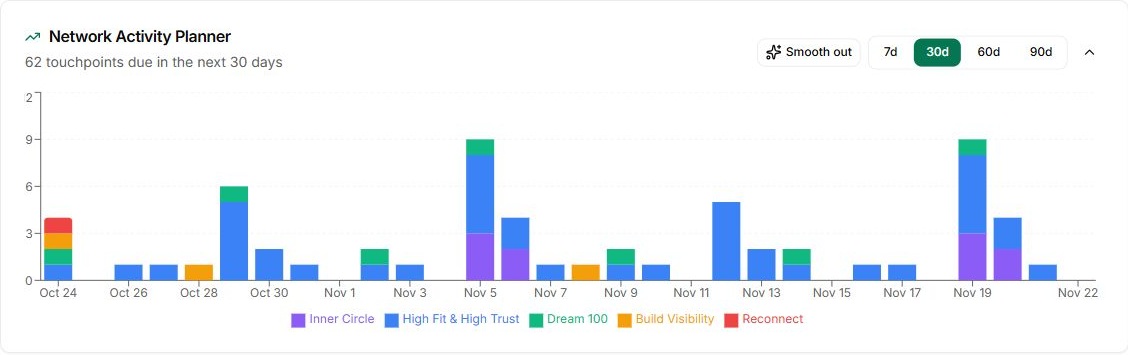
The current Network Activity Planner showing upcoming touchpoints by relationship rhythm.
The current People Rhythm board, with contacts grouped by the relationships you want to maintain. Fictional demo data shown.

What gets in the way

A single contact list cannot tell you who deserves your time.

You know some people need regular contact and others only an occasional conversation. A flat list leaves you to remember the difference.

Everyone looks equally important.

Your closest clients sit beside people you barely know.

The rhythm lives in your head.

You remember to reconnect when a name happens to come up.

The reminders pile up.

A generic cadence creates more work than you can sustain.

How Relationship Review works

Review the person. Choose the rhythm. Plan the follow-up.

Use the People list and Rhythm board to organise the relationships you want to maintain.

01Review your network

See how your relationships are organised.

Open the Rhythm view in People to see contacts grouped by their current rhythms. Turn off Hide unassigned to include people who still need a decision.

Review a manageable set around the work you already have.

The current People Rhythm board, with contacts grouped by the relationships you want to maintain.
The current People Rhythm board, with contacts grouped by the relationships you want to maintain. Fictional demo data shown.
02Relationship context

Look at the person behind the name.

Open their record and review the conversations and meetings you have already had.

Your knowledge of the person matters alongside the recorded history.

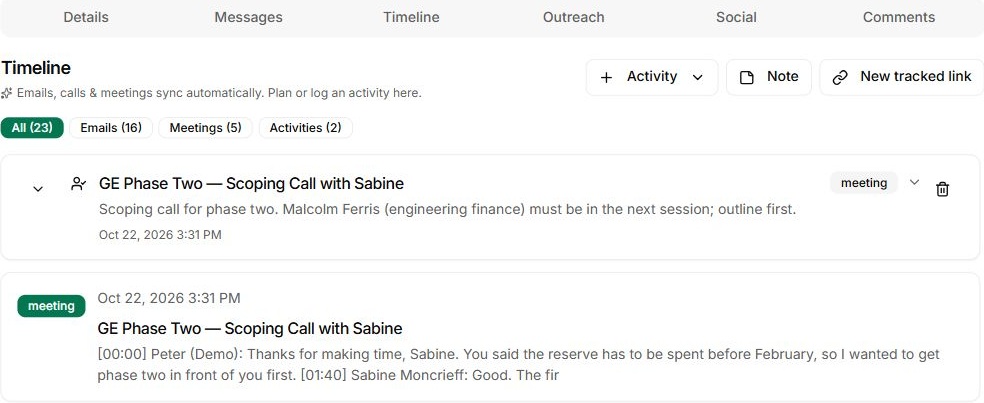
Sabine’s recorded meeting timeline, with channel counts and the next-session context in the demo.
Sabine’s recorded meeting timeline, with channel counts and the next-session context in the demo. Fictional demo data shown.
03Choose a rhythm

Give the relationship an appropriate rhythm.

Use the person’s Rhythm control to choose from your existing rhythms.

Your close collaborators and more distant contacts need different attention.

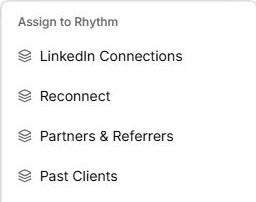
The real Assign to Rhythm menu in People, showing existing rhythm choices.
The real Assign to Rhythm menu in People, showing existing rhythm choices. Fictional demo data shown.
04Keep it manageable

Turn the sorting into a realistic plan.

Review the upcoming touchpoints across your groups and spread the work around delivery.

The goal is a useful network you can maintain.

The current Network Activity Planner showing upcoming touchpoints by relationship rhythm.
The current Network Activity Planner showing upcoming touchpoints by relationship rhythm. Fictional demo data shown.

What Nynch decided, and why

Why a new contact gets no status until you decide.

Relationship Review is where imported people are sorted into rhythms. These two rules decide what sorting can and cannot change, and why each would be hard to hold to by hand.

  1. A new contact has no status until you choose one or they act.

    An imported person is not labelled a Target or a Lead by default, and the old default labels were cleared. A status comes from your own choice, from a rhythm you set, or from something the person did, such as filling in a form or replying to a campaign. The review is where you decide, rather than inheriting a label the system guessed.

    Doing it yourself: You would need to set a status for every imported person yourself, and keep each one current as they replied, moved or went quiet.

  2. Moving someone into a rhythm does not overwrite a status you set by hand.

    Review is where people are placed into a rhythm, and that placement is kept apart from your own choices. A status that came from a rhythm is recorded as coming from the rhythm, so you can see where it came from. A status you chose yourself stays until you change it.

    Doing it yourself: You would need to keep a list of the statuses you chose yourself, and check it before every bulk move.

One connected Nynch platform

From finding the right people to winning their next piece of work.

Prospecting, relationships, meetings, proposals, Deal Rooms and client growth work together in Nynch. Start with the job you need to do today. Keep the context as the relationship develops.

The details

Questions about
Relationship Review.

What is the relationship review for?

It helps you work through contacts that still need a decision about where they belong in your network. Review the person and choose an appropriate relationship group.

What information helps me choose?

Use the person’s role, company, ideal client fit, recent activity and any active opportunity context. Add your own knowledge of the relationship to that evidence.

Where do I choose the rhythm?

Open the Rhythm control on the person’s row or record and select an existing rhythm. Choose one that reflects how you intend to develop the relationship.

Do I need to sort everyone in one sitting?

No. Work through a manageable set, then return to the remaining contacts. The purpose is to make useful decisions rather than rush through the list.

What happens after I choose a group?

The person joins the relationship grouping you selected. Use your group rhythms and the activity planner to see the contact work ahead.

Does assigning a group send a message?

Organising a contact is separate from writing to them. Review any campaigns or automations attached to your groups so you understand the actions you have configured.
Make staying in touch a rhythm you can keep.

See how groups turn your network into manageable relationship work.

Book a call

30 minutes. On your real data. Not generic slides.