Skip to content
Product overview
Explore all 15 product areas1. Services and Offer2. Ideal Client Profile3. Find Prospects4. LinkedIn Network5. Relationship Management6. Relationship Intelligence7. Value Audits8. Personalised Outreach9. Authority and Content10. Meeting Intelligence11. Pipeline and Opportunities12. Proposals13. Deal Rooms14. Client Management15. Grow Existing Accounts
Today and AssistSell your business
Use cases Pricing In Person Workshop Resources Sign in Book a call
← Back to changelog
New

See who on your team already knows the person

Teammate LinkedIn connection context gives you another route to check before starting a cold conversation.

Release note added 30 October 2026. Screenshots show the current demo app.

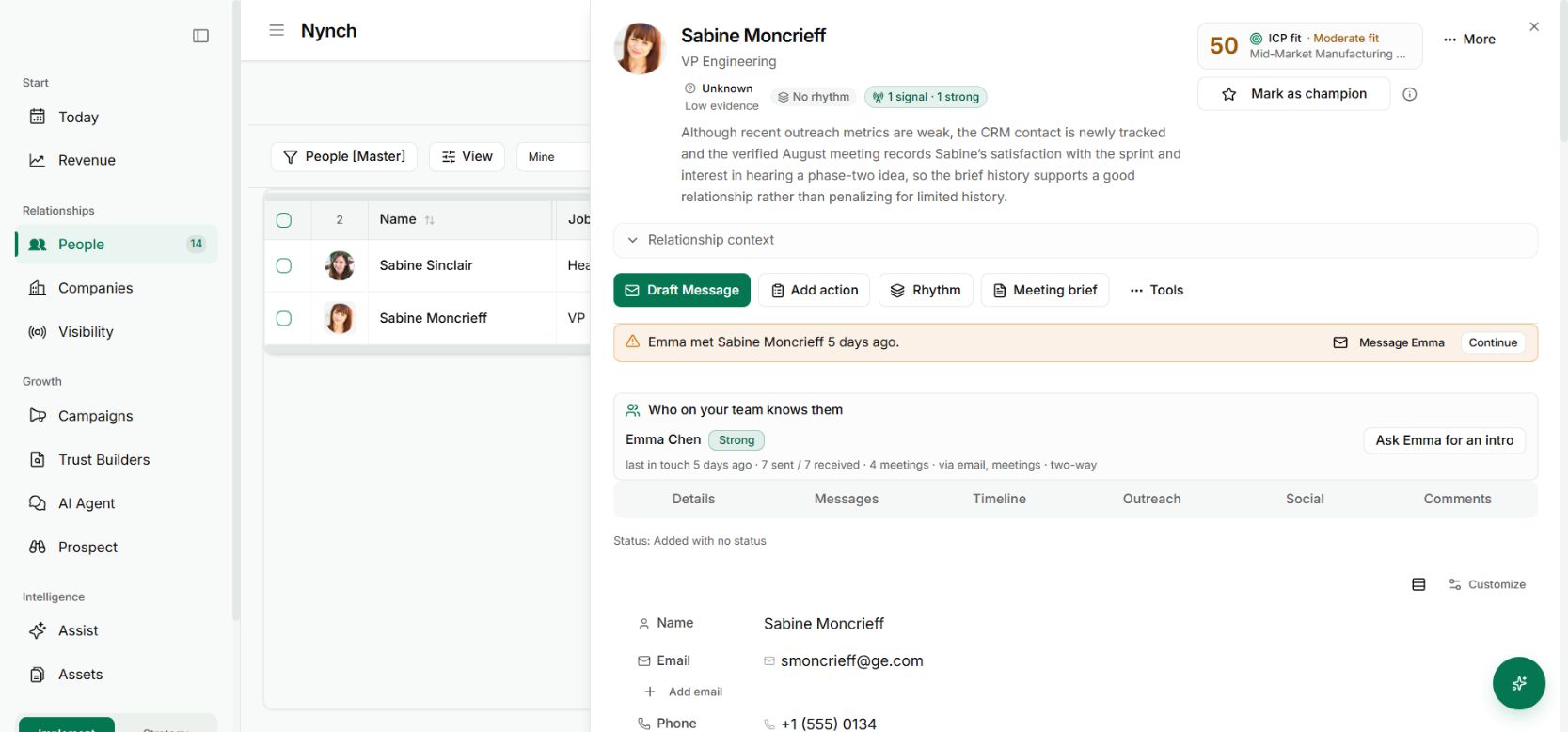
The Who on your team knows them panel on a demo contact record
The team context panel, shown here with email and meeting evidence. LinkedIn evidence appears when a supported connection has been recorded. Demo workspace with illustrative data. Open the image to see it full size.

Before writing to someone new, there is a useful question to ask: does anyone on the team already know them?

That answer is often spread across separate LinkedIn accounts and private recollections.

The change

Nynch can show recorded teammate LinkedIn connections against a person. Supported connection imports and profile observations help build that picture.

The important word is connection. A LinkedIn connection does not prove a close relationship, permission to introduce you or influence over a buying decision.

Put it to work

Open the person’s record and inspect the teammate context available. Ask the teammate how they know the person and whether an introduction would be welcome.

Give them a concise reason for the approach and make it easy to decline. The value of the introduction depends on their judgment and the relevance of what you want to discuss.

Why it is useful

You can discover a route that was already inside the team before investing in a cold approach. It can also prevent two colleagues from starting disconnected conversations with the same person.

Treat the visible connection as a starting point for coordination, then let the person who owns the relationship decide what is appropriate.

Ask for a relevant introduction, not a name drop

When a teammate connection is available, explain why the proposed conversation could help the recipient. Give your colleague enough context to decide whether an introduction is appropriate.

A connection is not proof of a close relationship. Check any supporting activity and let the colleague judge the strength of the path. The team introduction guide shows the wider workflow, including the email and meeting evidence visible in the demo.

See it for yourself

See Nynch from start to finish

The complete walkthrough: 28 minutes, every screen. Or pick the part you need.

Choose where to start

Chapters Jump to any partHide chapters
  1. Why relationships win the work
  2. A memory that thinks
  3. Every contact arrives already researched
  4. Your inbox, with intelligence
  5. Arrive prepared, every time
  6. A network that never goes cold
  7. Personal outreach, at scale
  8. Campaigns, run with AI agents
  9. Turn conversations into signed work
  10. The procrastination beater
  11. Your AI partner, on every screen
  12. Build the network you do not have yet
  13. Part two: build the foundations
  14. Name the problem, and prove it
  15. Know exactly who you serve
  16. Sell outcomes, not hours
  17. Stand for something
  18. Get the right clients coming to you
  19. Now watch it all work

See this working for your business

Bring a real relationship or opportunity. We will show you where Nynch can help.

Book a call

30 minutes. On your real data. Not generic slides.