You have already written the explanation of your method. Asking AI to invent another version from scratch is a strange way to put that work to use.
The change
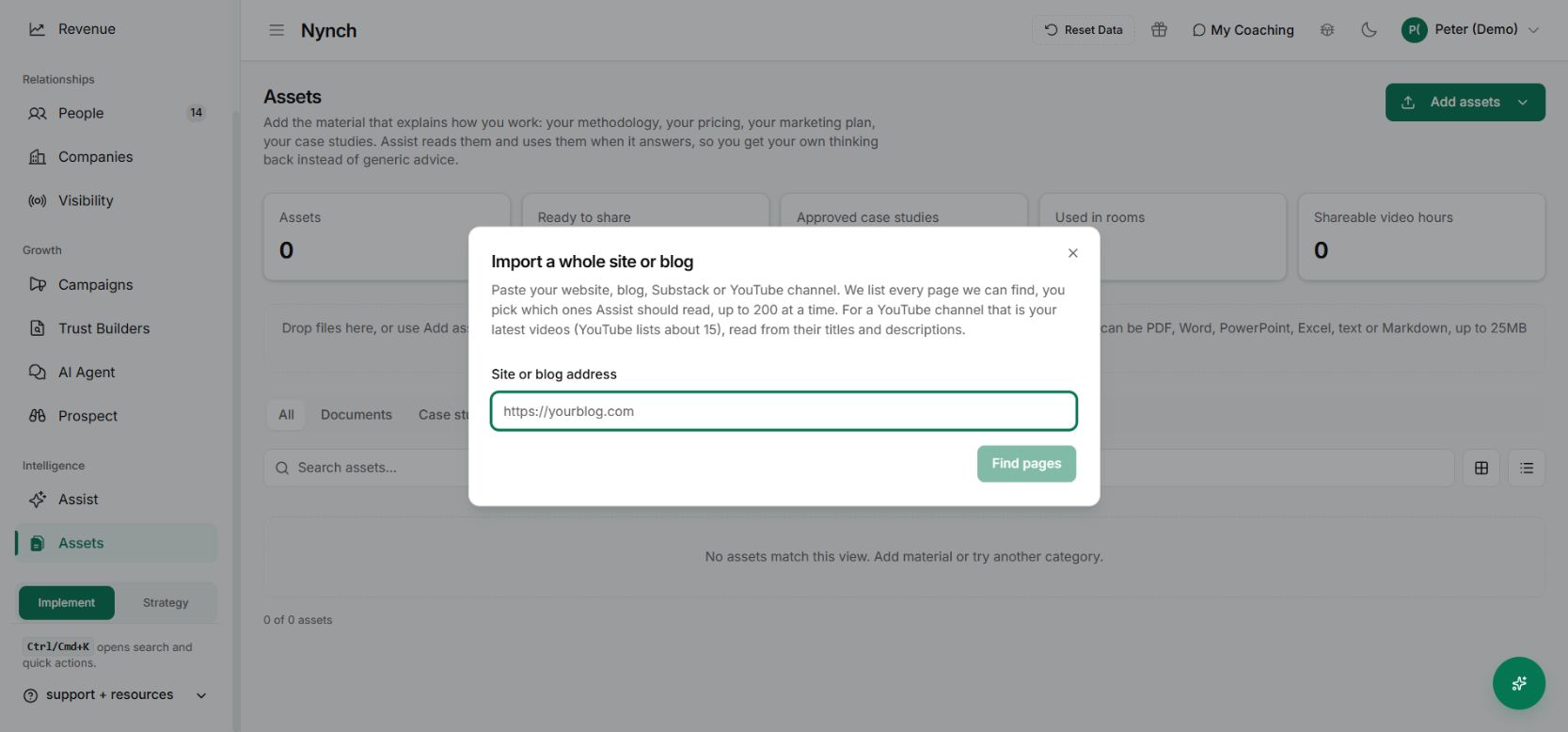
In Assets → Add assets, choose Import a whole site or blog. Nynch looks for pages and lets you choose which ones to import, up to 200 at a time.
The selection step matters. You do not need the privacy policy or an old announcement treated as an explanation of your current service.
Put it to work
Start with your own site. Find the pages, review the list and select the material that explains your method, services and evidence.
Check the imported content before using it as a source. If a page is outdated, fix the source or leave it out. The workflow can also accept a YouTube channel, but the visible import guidance distinguishes titles and descriptions from a transcript of every video.
Why it is useful
Assist gets a more relevant starting point, and you get more use from work you have already done. A proposal or content draft can draw on your own thinking instead of a generic description of your profession.
Begin with a handful of strong pages. A small, accurate source set is more useful than a large collection you have not checked.
Check the prepared answer against your own approach
Once the imported pages have finished processing, ask Assist a bounded question about your method. Compare the answer with the relevant page and check whether the current service or pricing explanation has been used.
If the source is outdated, correct or replace it before asking for another draft. Importing a website gives the system material to retrieve. It does not guarantee that every page was available or that every answer will use the right passage.