A diagnostic is often where your expertise becomes tangible. You collect evidence, test an explanation and help the client decide what deserves attention.
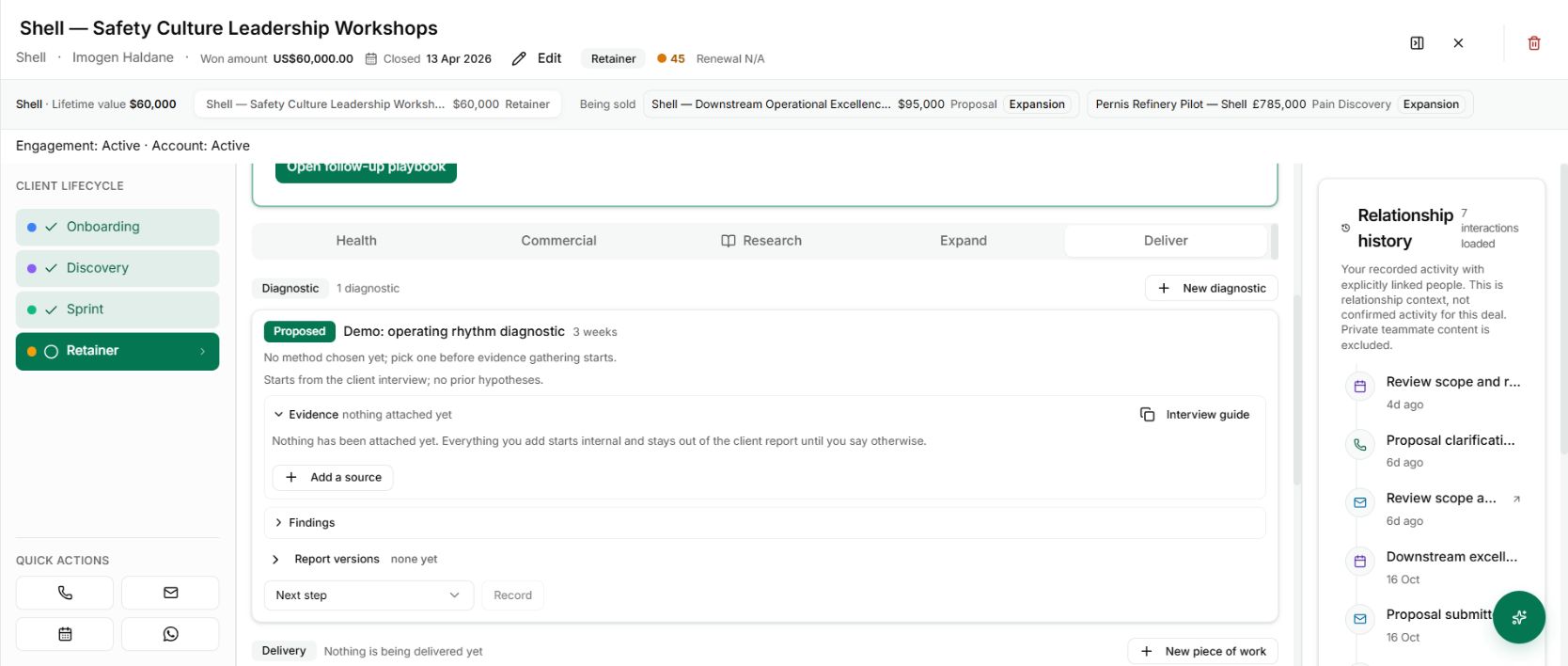
That work can now have a home on the client record. The Deliver tab supports a diagnostic with its own method, evidence, findings and progression through review.
Make the question worth answering
Create the diagnostic under the client and give it a specific purpose. “Operating rhythm diagnostic” is a starting label. The actual question might be why weekly priorities fail to turn into decisions across three teams.
Choose the method before evidence gathering begins. The workflow keeps the selected method with the work, rather than allowing the basis of the assessment to drift unnoticed halfway through.
The screenshot shows a proposed example. No interviews, findings or client agreement have been invented to fill it.
Move from evidence to a reviewed explanation
Attach the relevant sources, prepare the interview guide and build findings around what the material supports. The stages separate intake, analysis, consultant review and client debrief. A draft finding is not a delivered conclusion.
Use the evidence register to distinguish internal material from evidence you permit in a client report. Then review the draft findings before presenting an argument to the client.
Keep the work beyond one sale
The diagnostic belongs to the client company. It can relate to a deal, but it does not have to disappear into a single sales opportunity.
That gives the next engagement a clearer starting point: the question you investigated, the evidence you used and the conclusions you actually reviewed. It is a working record of the assessment, not just another PDF in a folder.