The reason most AI-generated proposals, follow-up emails, and deal-room briefs feel generic is not a model problem. It is a data plumbing problem. Your commercial content lives in seven different tools, the AI is connected to one of them, and everything it produces is shaped by what it cannot see.
I have lost count of how many times someone has shown me an AI draft and said, “this could be for any consulting firm.” That is because it could be. The model is doing its job: producing plausible-sounding text from the data it can reach. The issue is that the data it can reach is a sliver of your actual commercial story.
Your services list with real pricing sits in a Google Doc. Your buyer-problem framing lives in a pitch deck. Your buyer profiles are in a persona doc nobody has touched since 2024. The AI sees none of this. It sees whatever is in your CRM, which is mostly contact records and stage notes.
If your AI assistant is generating output from one shallow data source, no amount of prompt engineering will make it sound specific to your business. The fix is not a better prompt. The fix is consolidating where your commercial content lives. This is what the engineering community calls a single source of truth: for any given fact, there should be exactly one place it lives. Apply that to your commercial content and the AI’s output stops drifting.
You do not have to accept “generic-sounding AI” as the price of using AI. You can fix the underlying data problem in three steps.
1. The “Seven-Tool Audit” to find where your story lives
You cannot fix the fragmentation until you can see it. Most consulting practices have their commercial content scattered across seven or more tools without realising it. Atlassian’s research on context-switching found knowledge workers lose roughly 9% of their day to switching between fragmented tools. That is not a consulting study, but the pattern maps cleanly onto how practitioners hop between docs, decks, and CRMs.
The seven-tool audit is simply a list of every place that holds services and pricing, buyer problems, buyer profiles, ICP definitions, customer references, objection handling, and discovery scripts. For each, write down what it contains, when it was last updated, and who owns updating it.
Most audits surface 8 to 12 tools holding overlapping and contradictory versions of the same content. Pricing on three documents that do not match. Services on the website that are not in the proposal template. Buyer profiles described differently in two places.
A concrete case: your services page on the website says “from £18K.” Your proposal template defaults to “£15,000 starting.” Your sales playbook recommends “tier 2 at £22K minimum.” All three are technically true. None match.
Open a blank document. Title it “Where Our Commercial Content Lives.” For each of the seven content types above, write the tool, the file name, the last updated date, and who owns it. Do this for 30 minutes. Save the result. You will be staring at the seven-tool problem in concrete form.
2. The “Three-Anchor Consolidation” to pick the canonical sources
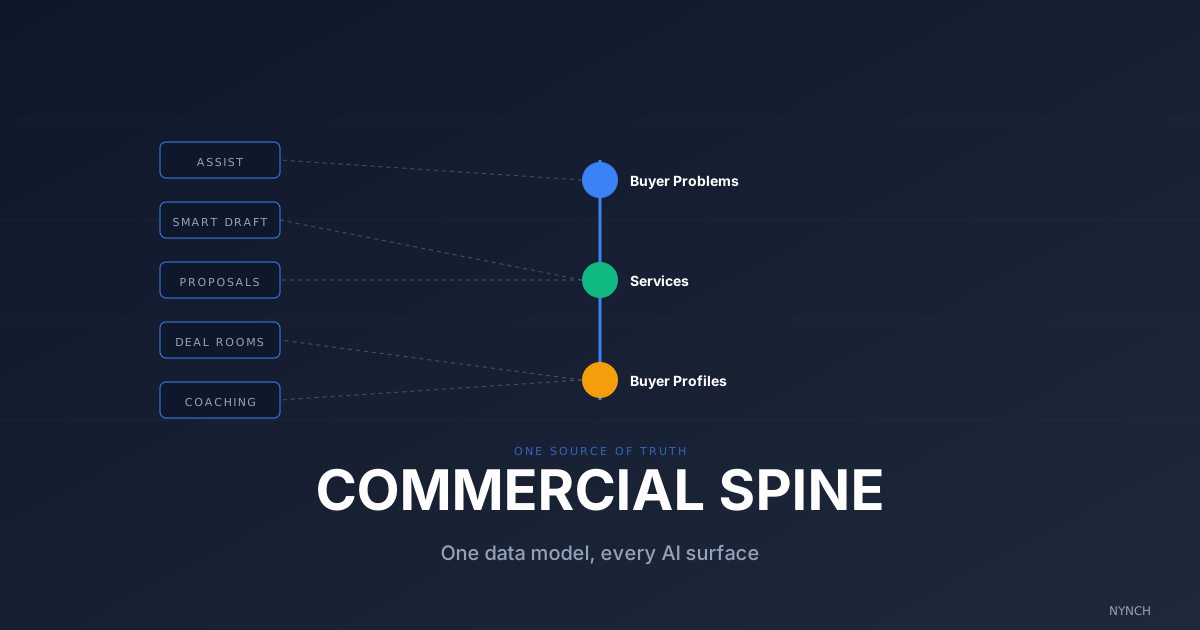
Seven tools is unmanageable. Three anchors is workable. Once you can see where everything lives, pick one canonical source per concept type: one services list, one buyer-problem document, one buyer-profile rubric. Everything else becomes a downstream reference.
The three anchors should be:
- Services with canonical pricing, scope, and engagement model.
- Buyer Problems as structured records of the problems you solve, plus the signals that indicate a buyer has each one.
- Buyer Profiles describing the buyer types you sell to, with role, objections, and decision criteria.
The result is one place to update commercial content. Change pricing in the Services anchor. Add a new buyer pain to Buyer Problems. The proposal template, website, pitch deck, and AI tools all reference the three anchors instead of carrying their own out-of-date copies.
If services currently live in Notion, your proposal template, your website, and three pitch decks, you already know why the AI never sounds consistent.
Pick one location to be the canonical Services anchor (a single document, ideally structured rather than freeform). Migrate the most current version of every service into it. Mark the old locations as “deprecated, see [anchor].” Do the same for Buyer Problems and Buyer Profiles. By the end of week one, the three anchors should hold the canonical truth.
3. The “AI Surface Pointer” rule to make the AI see all three
Consolidation only matters if the AI tools you use actually read from the anchors. Most AI sales assistants connect to your CRM and stop there. To get coherent output, the AI has to read the buyer problem, the relevant service, and the matching buyer profile in a single context window. Anthropic’s contextual retrieval research makes the same point: model quality is upper-bounded by the data it can see.
The rule is simple. Every AI feature you use (proposals, smart-draft emails, deal-room briefs, coaching) should reference the three anchors. If your tool only reads your CRM, you either need a different tool, or you paste anchor content into the prompt every time.
The result is AI output that reads as though a human who knows your business wrote it. Specific service named, real pricing, the buyer profile’s objections addressed, the buyer problem’s exact framing, in one cohesive piece.
Try this next time you ask an assistant to draft a follow-up for a CFO at a 50-person firm who mentioned cost concerns. Before generating the draft, paste in the relevant service from your Services anchor (with pricing), the matching buyer problem from Buyer Problems (cost concerns at scale), and the CFO buyer profile from Buyer Profiles (decision criteria, communication style). Compare the output to what you get without the anchors. The difference is your seven-tool problem made visible.
How Nynch Helps You With This
Manual consolidation works. I mean that. Run the audit and set the three anchors by hand at least once. You will learn where your story actually lives.
The part that breaks down at scale is the AI surface pointer rule. Remembering to paste three anchors into every prompt is fine for a week. It is not fine for a practice. Nynch builds the three-anchor model into the data layer, so every AI surface reads from it automatically.
You get a structured Buyer Problem record. Each buyer problem has a name, buyer-facing description, signals that indicate a buyer has the problem, example customers, and the services that address it.
You get a structured Service record. Each service has scope, pricing tiers (with explicit ranges), engagement model, mapped buyer problems, mapped buyer profiles, and past customers.
You get a structured Buyer Profile record. Each profile has role patterns, decision authority, typical objections, decision criteria, and preferred communication style.
Every AI surface reads from all three. Assist references them when answering questions. Smart Draft pulls from them when writing follow-ups. Proposals inherit scope, pricing, and language from the relevant Service. Deal rooms display the matching buyer profile in-line. Coaching flags gaps when a deal is missing context.
If you want to see your existing services and buyer profiles set up against the three-anchor model, book a 20-minute walkthrough. You will see what a populated commercial setup looks like on a live account.
Once your commercial content is consolidated, the next question is whether your AI is actually using it, because consolidation without proper AI integration just gives you tidier silos.
Read next
- Build a £500k consulting practice on relationship capital, the operational rhythm that turns a roster of contacts into a compounding business.
- 3 Ways to Prepare Outreach So You Maintain 80% Utilisation Without Burning Out, Most consultants don’t need more contacts, they need clearer outreach prep.
- Wake up your dormant network, fill your week with warm conversations from people you already know.
Frequently Asked Questions
Why do AI-generated proposals feel generic?
Because the AI is reading from one tool at a time. Your buyer problems, your services, and your buyer profiles usually live in seven different places (website, Notion, CRM, persona doc, proposal template, pitch deck, sales playbook). The AI is connected to one of them. The output is whichever fragment it can see, padded with generic LLM language for everything it can’t.
What is a buyer profile and how is it different from an ICP?
An ICP (ideal customer profile) describes which companies you sell to. A buyer profile describes which person inside that company you’re selling to: their role, decision authority, typical objections, communication style, and what they care about. ICP filters the company. Buyer profile shapes the message.
What does it mean to have a single source of truth for commercial content?
It means buyer problems, services, and buyer profiles all live in one connected data model that every other tool reads from. When you update a service price, every proposal, deal room, follow-up email, and pitch deck inherits the change automatically. No manual update of seven separate documents. No drift between them.
How do I consolidate fragmented commercial content?
Pick one canonical source per concept type (one services list, one ICP rubric, one buyer-profile doc). Migrate everything from the other six tools into those three. Then make a rule: any change goes into the canonical source first, never directly into the downstream tool. Downstream tools (website, proposal template, etc.) reference the canonical source, not their own copy.
Will switching to a single source of truth break my existing workflow?
Only briefly. The first two weeks of consolidation are painful because you have to reconcile inconsistencies between tools. After that the workflow is faster because you stop rewriting the same content in different places. Most consulting practices recover the consolidation time within a month.