Google Workspace integration
isn’t a network strategy.
Copper is a useful CRM if your bottleneck is a team that lives in Gmail and Calendar and you want a contact record to follow them across Workspace. You’re a solo consultant or fractional executive, and your bottleneck is different. Your network is bigger than your Workspace. The signals that win you the next £75,000 engagement come from a LinkedIn job change, a news mention, a relationship going quiet for ninety days. Nynch reads all of that for you and tells you who to contact today.
A pipeline that thinks. Currency, probability, every overdue action surfaced. Built for the consultant whose network spans far beyond Gmail.
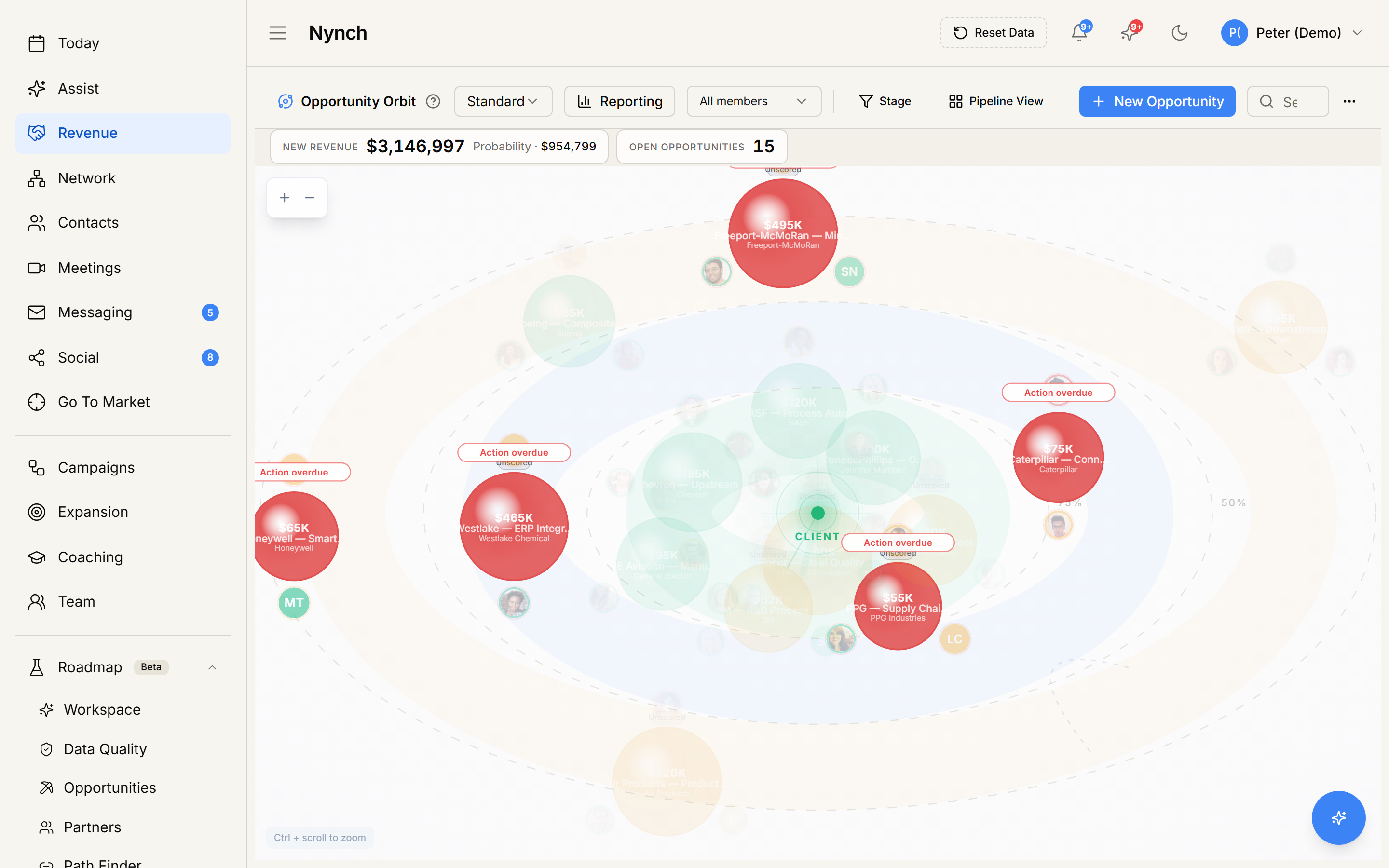
Workspace Sidebar vs. Network Monitor
Copper solved a real problem for teams whose work lives inside Google Workspace. Open an email, see the contact record. Schedule a meeting, see the deal context. Drag a deal between stages from inside Gmail. For teams running shared sales motions inside Workspace, that integration is genuinely useful.
But you are not a Workspace sales team. You are an expert consultant, a fractional executive, or a boutique agency founder.
Your professional network is not a list of email threads. It is a graph of twenty years of relationships, half of which never enter your Gmail inbox at any given month. They send signals in LinkedIn posts, job moves, news mentions, conversations in someone else’s podcast. Copper shows you a record when you open the email. The signals that win you your next engagement are the ones that never reach your inbox.
Nynch is the AI CRM for consultants and fractional executives. Built for the individual expert who IS the business. It monitors your whole network across Gmail, Calendar, LinkedIn, news, and meeting transcripts. It tells you who to contact today, why, and what to say. No data entry. No Workspace dependence.
Three Differences That Matter
Copper shows you records when you look. Nynch tells you who to contact today before you look.
Copper is a Workspace sidebar. Open an email, see the contact record. Open a calendar invite, see the deal. The CRM responds to your activity, in the moment you happen to look at it.
Nynch is proactive. It reads Gmail, Calendar, LinkedIn, news, and meeting transcripts in the background and surfaces the ten people in your network worth contacting today. You don’t go looking for the right record. The right record finds you when it matters.
Copper auto-populates contact fields. Nynch holds both sides of every relationship.
Copper enriches contact records from Workspace activity: phone numbers, titles, last-touched date. Useful, tidy, factual.
Nynch holds both sides of every relationship. Your clients and prospects drop hints, make promises, mention timelines. Nynch captures everything they said and did and surfaces it at the moment it matters. A client said in October “we always have leftover budget at year end.” Nynch surfaces that line twelve months later when you need it.
Copper is built around Google Workspace. Nynch monitors your whole network.
Copper’s value sits in its tight Workspace integration. Gmail, Calendar, Drive, Meet. If your relationships live in Workspace, Copper sees them.
Nynch monitors LinkedIn posts and job changes, news mentions, meeting transcripts, and Gmail and Calendar too. Your sleeping network is not in Workspace. It is in the LinkedIn experience change you didn’t see, the podcast appearance you didn’t hear, the budget line a client said in March that becomes urgent in October.
Choose the Tool Built for Your Business Model
- → Your team lives inside Google Workspace and you want contact records embedded in Gmail and Calendar.
- → Your bottleneck is shared Workspace visibility on deals, not network-wide signal monitoring.
- → Your network rarely changes and you don’t need to watch LinkedIn, news, and meetings for buying signals.
- → You sell expertise and your network is your pipeline.
- → You need to know who is going cold across your whole network, not just who is open in Gmail right now.
- → You want a CRM that reads LinkedIn, news, job changes, and meeting transcripts on your behalf.
- → You want zero data entry and AI-driven next best actions every day.
Your network is sending
buying signals right now.
See what your Sleeping Network looks like and discover how much dormant network value is hiding in relationships you have neglected.
Nynch vs. Copper, Answered
Copper is a CRM that lives inside Google Workspace. It surfaces a contact’s record when you open their email and syncs contacts between Gmail, Calendar, and Drive. Nynch is the AI CRM for consultants and fractional executives. It reads Gmail, Calendar, LinkedIn, news, and meeting transcripts to know who in your network is going cold and who just hit a buying trigger. Copper sits inside Gmail. Nynch monitors your whole network.
Copper is excellent if your bottleneck is a team that lives in Gmail and you need contact records to follow them around Google Workspace. Solo consultants and fractional executives have a different bottleneck. Their network is bigger than their Workspace, and the buying signals come from LinkedIn job changes, news mentions, and quiet relationships going cold. Nynch is purpose-built for that job.
No. Copper is a Gmail sidebar that surfaces records on demand. Nynch is the opposite posture. It reads Gmail in the background, alongside Calendar, LinkedIn, and meeting transcripts, and proactively tells you who to contact today, why, and what to say. You don’t go looking for the record. The record finds you when it matters.
Copper’s AI focuses on auto-populating contact fields and suggesting record updates as you work inside Gmail. Nynch’s AI is fundamentally different. It monitors email, calendar, LinkedIn, news, and meeting transcripts across your whole network to detect buying signals and relationship decay. It holds both sides of every relationship. Copper helps you keep the record clean. Nynch tells you what to do next.
Yes, and it is straightforward. Nynch connects to Gmail, Calendar, LinkedIn, and Zoom to build your relationship database automatically. You don’t need to export or import anything from Copper. Nynch learns your relationships from your actual communication patterns. You can run both systems in parallel and migrate at your own pace.