Most consultants I talk to have roughly 3,000 LinkedIn connections and roughly 600 contacts in their CRM. The 2,400 connections that never made it across are the quiet cost of capture friction. A short three-step habit closes most of that gap. Without it, you lose roughly 750 useful relationships a year to the small barrier of opening a CRM tab. The same pattern shows up in the wider data on professional relationships: LinkedIn’s economic graph research tracks more than a billion professional connections, and the conversion rate from “connection” to “active relationship” stays low across every industry they study.
You meet someone useful on LinkedIn. You exchange a few messages. You think “I should add this person to my CRM.” Then you do not. Moving them from a LinkedIn profile into a CRM contact means copying the URL, switching tabs, opening a new contact form, filling in name and company, picking a tag, and hitting save. It is only about 60 seconds, but 60 seconds of context-switching is enough that you keep deferring it. Two weeks later the context is gone. The contact never makes it across.
If you only capture the five people a week you remember to capture, the other ten disappear into a LinkedIn graveyard. They are still connections. They are not part of your relationship system. None of them show up in a morning briefing. None of them are available for warm-intro paths. They sit as dead weight until you bring them across.
Capture has to become a habit you run in the moment, not a job you mean to do later.
1. The “Capture On Connection” rule to make it automatic
Capture has to happen at the moment of connection, not later. Two weeks of delay usually means zero capture. A few seconds of delay, while the profile is still open, usually means full capture. This is the mechanism BJ Fogg describes in Tiny Habits: behaviours that ask for even a small amount of friction at the wrong moment fail almost every time.
The rule is one change to your LinkedIn habit. Every time you accept or send a connection request, before you switch tabs, add them to your CRM. Even a sparse record (name, company, where you met) is enough. The record itself is what matters. Proper tagging can wait.
The result is a near-100% capture rate on new connections. Most consultants sit at 30 to 50%. Moving toward 100% adds 500 to 1,000 contacts a year that would otherwise have been lost.
Example: you just accepted a connection request from someone you met at a conference last week.
Do not close the LinkedIn tab. Add them to your CRM right now, even if all you put in is name, company, and “met at [conference]”. Tag for proper enrichment later. Repeat for every connection this week. By Friday your CRM should hold 5 to 15 new records you would otherwise have lost.
2. The “Sales Navigator Sweep” to mine search results in bulk
Sales Navigator is good at finding the right people. Most consultants run searches, scroll through results, and capture nothing. The search becomes a research exercise that produces no data, because turning a 200-result search into 200 CRM contacts is a 90-minute slog nobody wants to do.
A Sales Navigator Sweep is a 30-minute weekly session where you run one targeted search and capture every match that meets your ICP criteria. Treat it as one batch job, not 200 individual decisions. The friction per contact has to stay near zero, or you will bail around result 30.
The potential is 50 to 100 qualified, ICP-matched contacts per session. Run weekly and that is 2,500 to 5,000 people a year entering your relationship-led pipeline.
Example: you run a Sales Navigator search for “CFO at consulting firms 50-200 employees in the UK.” Sales Navigator returns 180 results.
Block 30 minutes on Friday afternoon. Run one specific search. Capture every result that is a clear ICP match. Do not enrich, sequence, or message yet. Just capture. By the end of the session you should have 40 to 80 new records ready for the following week.
3. The “Job Change Watch” to catch champions on the move
Champions who liked you at Company A and just moved to Company B are among the warmest possible people to contact at Company B. The window is narrow, roughly 14 days, before they drown in onboarding. Miss it and you are starting from cold. LinkedIn’s research on workplace mobility shows executive role changes spike in Q1 and after summer, and the buying behaviour that follows (toolset reset, new vendor evaluation) concentrates in the first 30 to 60 days.
A Job Change Watch is a weekly LinkedIn check on the executive sponsors and main champions across your active client list. Look for title changes, a new company on the experience section, or a current role removed. Any of those should trigger outreach within 48 hours.
The payoff is turning a relationship asset into a new opportunity. Consultants regularly land work at companies they had no prior relationship with, simply because their champion moved there and they got there fast.
Example: your former champion at Acme Corp updated their LinkedIn yesterday with a new role at Beta Industries.
Open LinkedIn. Filter your network by recent activity. Scan for “started a new role” or “now at” updates from anyone who was a champion or sponsor at one of your past or current accounts. For every match, send a personalised note within 48 hours: “Saw the move to Beta. How’s the new chapter? Would love to compare notes.”
How Nynch Helps You With This
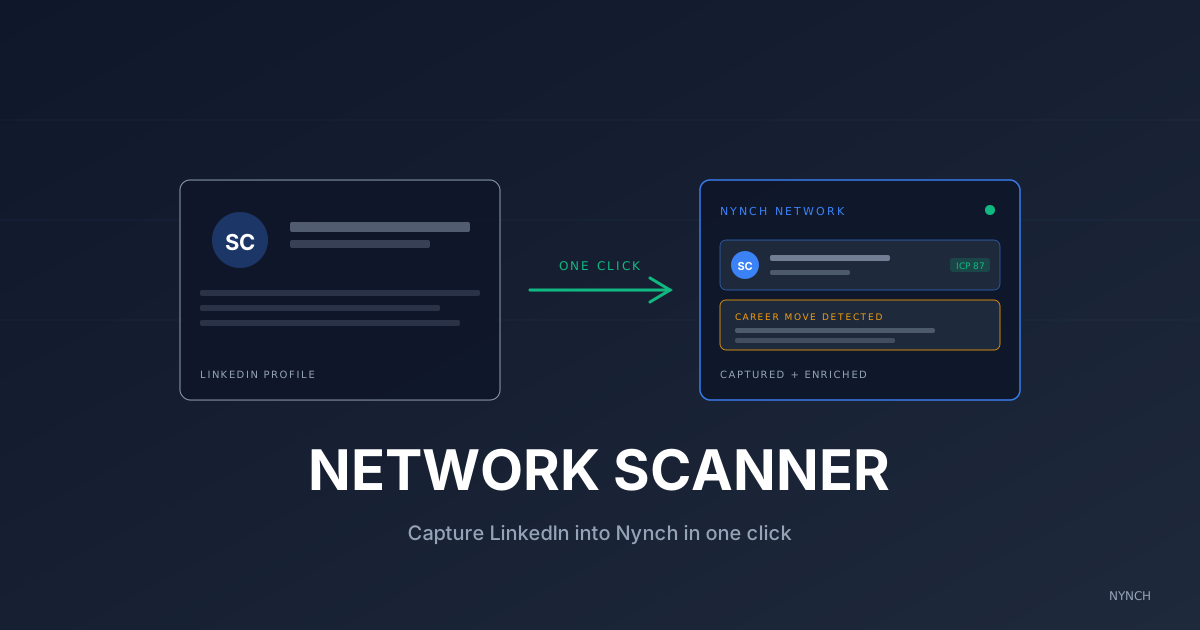
Capturing in the moment, sweeping search results, and watching for job changes work brilliantly when you remember them and poorly when you do not. The Nynch Chrome extension makes the mechanical part automatic.
One click instead of an eight-step capture flow. Hover any LinkedIn profile, click the Nynch icon, and the contact lands in your network deduplicated, ICP-scored, and ready for a campaign or bucket assignment.
Batch capture from Sales Navigator results. Same one-click flow on every search result. A 50-result search becomes 50 captures in about five minutes, not ninety.
Career-move alerts at the source. The extension reads LinkedIn experience-section changes, so when a champion adds a new role, gets promoted, or changes companies, you get the alert in Nynch within minutes, not three weeks later when you happen to see the post.
The extension is included with every Nynch subscription. See the extension page for the full install steps.
Once your capture rate is high, the next question is what to do with the new contacts you’ve added, because a captured contact you never reach out to is the same as one you never captured.
Read next
- Wake up your dormant network, fill your week with warm conversations from people you already know.
- 5 Ways To Pivot Your Request And Win Referrals From People Who Said “No”, A “no” isn’t a dead end. it’s a detour.
- The intent radar, exactly who to call today, read buying signals so your pipeline runs on intent, not guesswork.
Frequently Asked Questions
Why do consultants forget to add LinkedIn contacts to their CRM?
Friction. The act of moving someone from ‘I know them on LinkedIn’ to ‘they’re in my CRM with context’ takes 8 small steps and around 60 seconds per contact. At 15 new connections a week, that adds up to 15 minutes of admin per week that gets dropped. Most consultants end up with around 3,000 LinkedIn connections and only 600 in their CRM.
What is a job change alert and why does it matter?
A job change alert tells you when someone in your network moves to a new role or company. It matters because a champion who liked you at Company A and just moved to Company B is the warmest possible prospect at Company B. The window to reach out (when the move is fresh) is roughly 14 days. Without an alert, you usually find out three weeks later when the window has closed.
How often should I add new LinkedIn contacts to my CRM?
In the moment of meeting them, not in batch later. Capture friction compounds when you delay. The contacts you ‘meant to add’ usually never make it. Aim for 100% capture in the same week of the connection, even if the record is sparse, you can enrich later.
What is the difference between a LinkedIn connection and a CRM contact?
A LinkedIn connection is a one-way relationship in a public network. A CRM contact is part of your monitored, prioritised, action-tracked system. Connections without a CRM record can’t be flagged, alerted on, or sequenced into a campaign. Most of your LinkedIn network is invisible to your relationship-led growth process unless you bring it across.
Should I export my LinkedIn connections to a CSV instead?
It works once, but it doesn’t keep you current. Bulk exports give you a static snapshot. The contacts that matter (the ones who change roles, post about their priorities, or signal a new project) need ongoing capture, not a one-time import. A weekly capture habit beats a quarterly export every time.